Products
Four servers and the tools that talk to them. They share one account model and one look, so moving from one to the next feels familiar.

RFS captures sets of files as artifacts and moves them between repositories with as little network traffic and storage as possible. RFS Server is the central exchange point: it hosts the artifacts, serves the web interface and download links, and decides who may access what.
-
Stored and sent once
Content is split into chunks and addressed by its hash, so identical data is never stored or transferred twice.
-
Resumable transfers
An interrupted transfer continues at the chunk where it stopped, and every transfer can be verified.
-
Artifacts that describe themselves
Each artifact carries a path-like name, version information and retention rules that decide how long it is kept.
-
Access per artifact
Rules for users, roles, groups and devices decide who may read or write each artifact. Sign in with a passkey.
-
Azure DevOps builds
Build artifacts are indexed automatically, with their version and dependencies, as builds complete.
-
Fits into your systems
Webhooks report new artifacts, device registrations and failed jobs. Servers chain as proxies or upstreams.
Work with RFS from your desktop, your scripts or your own code. Each client keeps a local repository and talks to an RFS server once the device is registered, so no separate credentials are needed.
Workbench
A desktop app for Windows and Linux with the most common RFS operations: connect, browse, publish and fetch artifacts.
-
Mount as a drive
Open a repository as a read-only drive, through WinFsp on Windows and FUSE on Linux.
-
Preview and edit
Open text files in an editor and preview images, audio, video and PDFs without leaving the app.
-
Keeps itself current
An installation follows an update feed on an RFS server and installs new versions when the app closes.
-
Nothing to install first
The installer brings its own .NET runtime, so a machine needs no prerequisites.
SDK
Integrate RFS into your own applications, or automate it from scripts.
-
.NET library
The NFriends.Synchronization NuGet package: direct repository access, or a ready-made service for uploads and downloads.
-
PowerShell commands
Cmdlets for backups, restores, transfers and maintenance, the same operations the Workbench offers.

One account for every application that trusts it. Securiam is an OpenID Connect provider: people sign in once, prove who they are, and each application is told what they may do there.
-
Passwords stay in the browser
Passwords never leave the browser, and device-bound or synced passkeys replace them altogether.
-
Second factors
Authenticator apps, YubiKeys, email codes and recovery codes.
-
Existing logins welcome
Sign in with Microsoft Entra ID or Google, or join by invitation.
-
Roles per application
Each application defines its own roles, and the tokens it receives name only those.
-
A directory for applications
Applications look people up without holding a copy of the account list.
-
Permissions you can trace
An organizational tree of scopes and groups, with a trace that explains every decision, history and undo.

The people who use a product post what they wish it did, vote for the posts they care about, and read what the team answered.
-
Post and vote
Write a request in markdown with tags and files. One vote per person moves it up the list.
-
Answers you can follow
The team marks a post planned, started, completed, declined or a duplicate, and explains why.
-
Roadmap
Planned, started and completed posts side by side in three columns.
-
Notifications
Live in the app and by email for new comments, status changes and mentions, chosen per event.
-
Moderated files
Attachments wait for a moderator before anyone else can see them.
-
Signs in with Securiam
Sway keeps no accounts of its own. Who may respond or administer comes from roles at Securiam.

Start a timer when the work starts and stop it when it ends. PunchCard keeps the hours of a team in shared workspaces, sorted by client, project, task and tag, and shows where the time went.
-
One timer, everywhere
Start it in the browser, stop it on a Stream Deck key or from the desktop app. Every open tab and device shows the same running time.
-
Favourites and reminders
Start frequent work with one click. Reminders speak up when no timer runs or one has run too long.
-
Dashboard and reports
Days stacked by project, summaries grouped your way, billable or not, exported to CSV or Excel.
-
Team board
See at a glance who is working on what right now.
-
Azure DevOps, Jira and webhooks
Tasks mirror work items from Azure DevOps or issues from Jira, and tracked time can go to Tempo. Signed webhooks report the events of a workspace.
-
Signs in with Securiam
PunchCard keeps no accounts of its own. Devices and scripts use access tokens you can revoke.
Stream Deck plugin
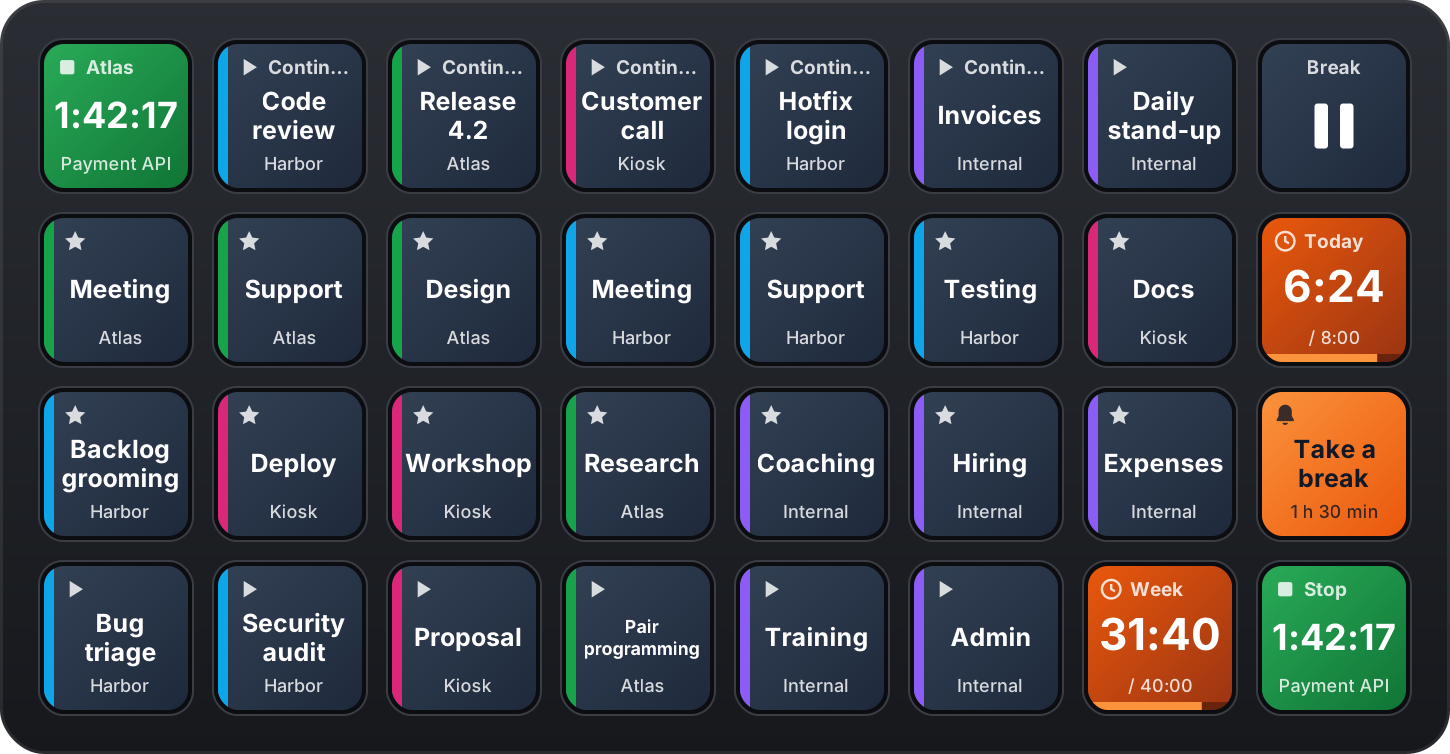
The timer, the favourites, the day's total and the reminders on the keys of an Elgato Stream Deck. The keys are live: a timer started in the browser lights its key, and a key pressed shows in the browser.
-
Keys that fill themselves
Favourite keys follow the order of your favourites, and a row of Continue keys always offers the last things you worked on.
-
Totals and reminders
Today's and the week's hours against your target, and reminders you answer with a single press.
-
Dials and pedal
On a Stream Deck +, turn a dial to move the start of the running timer or to pick a favourite. Every key works on the pedal too.
-
Connected once
One access token from PunchCard serves every key. Runs on Stream Deck 7.1 or newer, on Windows and macOS.
Built on one framework
All five come out of the NFriends framework. Installation guides, configuration references and the client SDK are documented in the open.
Open the documentation